> ## Documentation Index
> Fetch the complete documentation index at: https://docs.spendlessdaw.app/llms.txt
> Use this file to discover all available pages before exploring further.
# Export and share a project
> Choose .spend or .zip and prepare a project for another computer.
Export creates a copy and leaves the project in your library. Save and close it in FL Studio first, then let SpendLess finish updating.
Open the project's menu and choose **Export**.
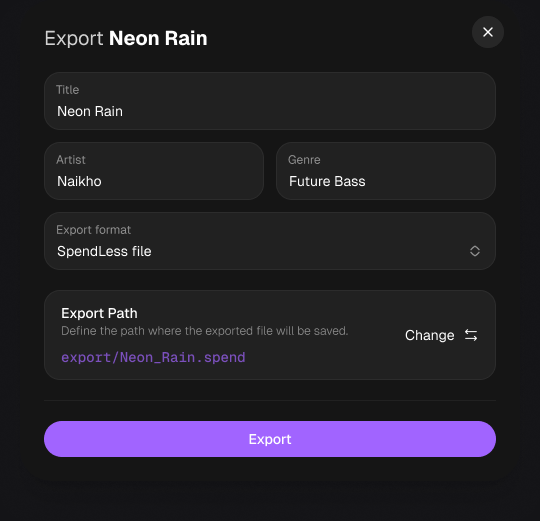
Check the title, artist and genre. Choose an **Export format** and use **Export Path → Change** to select where to save it.
Choose **Export**, wait for completion and check the resulting file. Test the project on the destination computer before relying on it as your only copy.
 | Format | Best for | Included |
| - | - | - |
| **.spend** | Keeping a project in the SpendLess workflow | FLP, collected samples, SpendLess appearance and attached media, plus supported project folders such as backups and exports. |
| **.zip** | A simpler FL Studio project package | FLP and collected samples. SpendLess icons, colors, covers, previews and backup history are not included. |
## Before sharing
Make sure all samples play, the receiver has a compatible FL Studio version, and the required plugins and libraries are installed and licensed. Plugins themselves are not bundled. Only share samples and other files you have permission to redistribute.
For a SpendLess archive, the other person can use **Import** and choose the **.spend** file. A ZIP import must contain an FLP.
An exported project is not an MP3 or WAV. Render audio in FL Studio, then [attach a preview](/en/audio-previews) if needed.
This documentation is built and hosted on [Mintlify](https://mintlify.com), a developer documentation platform.
| Format | Best for | Included |
| - | - | - |
| **.spend** | Keeping a project in the SpendLess workflow | FLP, collected samples, SpendLess appearance and attached media, plus supported project folders such as backups and exports. |
| **.zip** | A simpler FL Studio project package | FLP and collected samples. SpendLess icons, colors, covers, previews and backup history are not included. |
## Before sharing
Make sure all samples play, the receiver has a compatible FL Studio version, and the required plugins and libraries are installed and licensed. Plugins themselves are not bundled. Only share samples and other files you have permission to redistribute.
For a SpendLess archive, the other person can use **Import** and choose the **.spend** file. A ZIP import must contain an FLP.
An exported project is not an MP3 or WAV. Render audio in FL Studio, then [attach a preview](/en/audio-previews) if needed.
This documentation is built and hosted on [Mintlify](https://mintlify.com), a developer documentation platform.